
An all-new Hybrid Search Plugin for Obsidian in 30 minutes (ish).
Frustration + LLMs are an incredible combination for getting things done.


I got annoyed with Obsidian search, so I built my own search with ZVec
After trying every note-taking tool under the sun, I finally settled on Obsidian slightly over 2 years ago. It performs three main functions: daily notes, general tech notes and web clippings. For the first time ever I have a note per day. The upside is that I now have a large knowledgebase of everything I have done over the past 2 years. The downside is that it’s getting harder and harder to find anything.
The Obsidian built-in search is a crude keyword-only one that rarely finds what I need. There are a range of plugins to improve things and many of them provide semantic search using vectors and LLMs. I haven’t found one that I like. They are either clunky as hell or freemium where all the useful functionality is in the pay-for version.
2 months ago I used Claude Code to build me a new one using LanceDB. It worked reasonably well but was a rough prototype that needed regular nursing.
Last weekend, at the end of my summer vacation, I’d had enough, and decided to go again. The outcome was gobsmackingly good.
First tho, why Obsidian?
Obsidian is a desktop and mobile notes application built around local Markdown files. A folder of notes is called a vault. The files remain readable with any text editor, which gives the whole thing a useful sense of durability. There is no awkward export step if you decide to use something else in five years.
It also has a very capable plugin API. Community plugins can add views, commands, settings and integrations while keeping the core application fairly lean.
In my case, all of the Markdown files are held on Dropbox. And I have a simple Dropbox sync tool on my phone so that the same files are visible to Obsidian Mobile there.
What is Hybrid Search?
Most search is keyword-based which works ok for single documents. Vector search is meaning-based so you can enter “support” but it might also find mentions of “help”. Hybrid merges the two for the best of both worlds.
There are lots of tools which can provide the capabilities I need but ZVec from Alibaba caught my eye because it’s lightweight, fast and you don’t need a separate server running.
Say Hello to ZVec Hybrid Search for Obsidian
This time I used OpenAI Codex with the Sol 5.6 High model. I gave it my basic requirements, told it I’d like to use ZVec, pointed it at the old LanceDB repo and told it to build me a hybrid search plugin for Obsidian.
30 minutes later it had something working. And really working! I’ve never had something work so well so fast.
The result is ZVec Hybrid Search for Obsidian, an open source Obsidian plugin that combines traditional full-text search with local semantic search. It is now at version 0.2.6 and available as a public beta.
What the plugin does
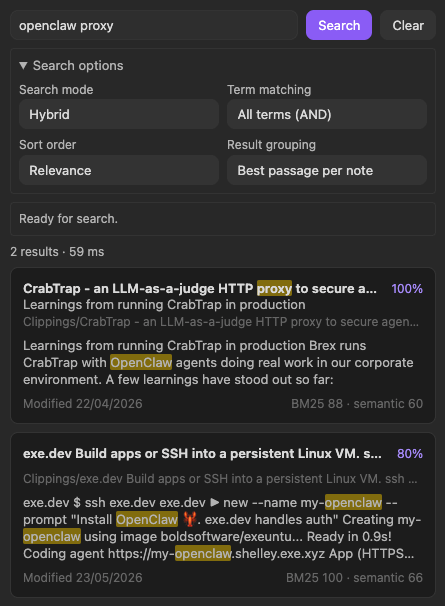
The plugin adds a search view to the Obsidian sidebar. It indexes all of (or whatever subset you specify) your documents in your Obsidian vault. Any time you add/remove/edit a document, it automatically updates its index almost instantaneously.
At search time, the plugin can run in three modes:
- Hybrid search combines BM25 keyword relevance with semantic similarity.
- Keyword search uses ZVec’s full-text index.
- Semantic search concentrates on meaning.
The result list links directly back to the relevant note and passage. Matching terms are highlighted and the preview includes the surrounding context.
There are controls for sorting by relevance, title, creation date or modification date. Results can be grouped by note or shown as individual passages. Search options stay collapsed in normal use.
Most searches should be type, press Enter, and read the answer.
Your docs never leave your machine
An important note is that this tool downloads and uses a very small MiniLM model from Hugging Face to do the embeddings. There is no use of OpenAI or Anthropic or any cloud-hosted LLMs. So your docs stay safe on your machine.
The awkward bits were distribution and installation
I spent a small amount of time refining the plugin after that initial 30 minutes. But overall it really did get it right first time.
Once it was working the way I wanted, most of the remaining effort went into making the plugin behave like something I could give to another person. It is now released on GitHub for macOS ARM64, Windows x64, Linux x64 and Linux ARM64
The plugin has not gone into Obsidian’s Community Plugin directory yet. I want some other people to kick the tyres and tell me it’s solid first. I started on Saturday and it became my daily driver on Monday. I used it a lot over the working day yesterday with zero issues.
It can be installed from GitHub with BRAT, the Obsidian plugin commonly used for beta testing. Or you can download manually from here.
BRAT also handles updates, which makes the beta reasonably painless to use.
Try it out and let me know how you get on.
If you use Obsidian on the desktop (mobile not supported yet or possibly ever) and fancy trying it, the code and install instructions are on GitHub. Feedback and bug reports are very welcome.